
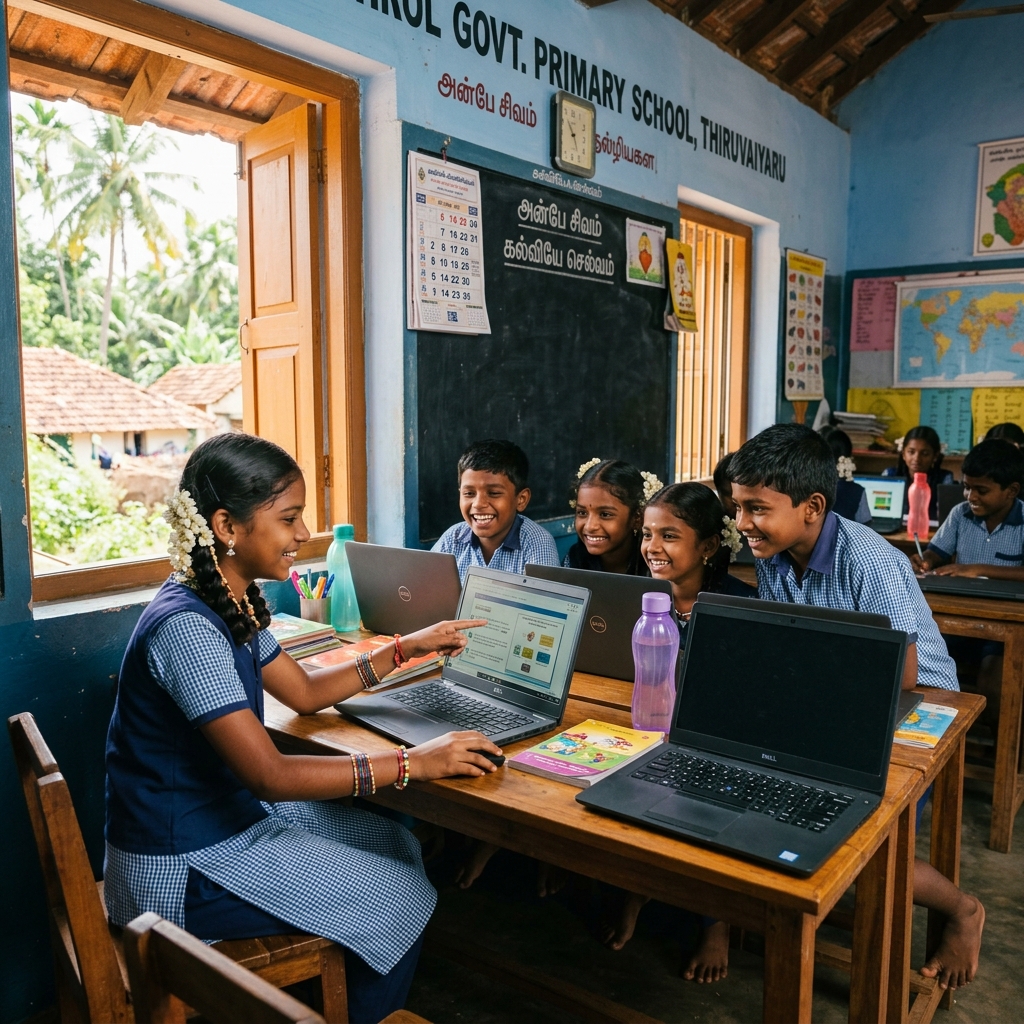
Computer Education for Rural Children: How Digital Skills Are Transforming Tamil Nadu's Villages
"That is not a dream. That is what happens when a child in a rural Tamil Nadu village is given one thing that changes everything — a computer and the knowledge of how to use it."
At Sundaram Ammal Foundation, a mission-driven non profit organization dedicated to education, skill development, and community empowerment, we are placing that tool — and that knowledge — in the hands of children who have always deserved it but never had it.
The digital economy has arrived in India's cities. But in thousands of villages across Tamil Nadu, children are still being taught computer science with printed diagrams of keyboards pasted to walls. No machines. No internet. No real skills. That gap — between what is taught and what is real — is the gap our Computer Education for Rural Children program exists to close.
Give a Rural Child Their First Real Computer Class.
Support Sundaram Ammal Foundation — Donate | Volunteer | Partner
Fund real digital skills for real children.
Visit sundaramaf.orgWhy Computer Education Is the Most Urgent Need for Rural Children Today
India adds over 50 million new internet users every year. The job market — even at entry level — increasingly demands digital competency. Government services, banking, healthcare, education: all are moving online. And yet, for children in rural Tamil Nadu, the digital world remains largely inaccessible — not because they are unwilling, but because nobody has ever shown them how.
Sundaram Ammal Foundation's Computer Education program is built on a simple belief: digital literacy is not a luxury for rural children — it is a survival skill. And our non profit organization is committed to delivering it at scale, at zero cost to families, and with measurable impact.
Computer Education Programs: What We Teach, Step by Step
1. Foundational Computer Literacy
Every journey starts here. Children and young adults who have never used a computer learn the complete basics — confidently and without fear.
- Keyboard confidence: touch typing, key navigation, and speed building
- Mouse and trackpad usage: clicking, scrolling, drag-and-drop, right-click functions
- File management: creating, saving, renaming, organizing folders and documents
- Safe internet basics: searching effectively, identifying unreliable sources, understanding browser safety
- Email communication: writing, formatting, attaching documents, managing inbox
2. Microsoft Office and Google Workspace for Academic and Career Success
The tools that run the modern workplace are now standard in our program. Students who complete this module are immediately ready for higher education, government job exams, and entry-level employment.
- Microsoft Word: typing essays, creating formatted documents, reports, and letters
- Microsoft Excel and Google Sheets: data tables, basic formulas, attendance charts, budget tracking
- PowerPoint and Google Slides: building presentations for school projects and competitions
- Google Drive: storing, sharing, and accessing school work from any device
3. Internet Skills and Digital Research
We teach children not just how to be online — but how to be smart online. This module builds critical digital thinking alongside practical skills.
- Effective search techniques: using Google — finding information quickly and accurately
- Evaluating online sources: spotting fake news, unreliable websites, and misinformation
- YouTube for learning: finding educational content, curating learning playlists
- Online safety and privacy: protecting personal data, understanding cyberbullying, safe behavior
4. Coding Fundamentals for School Students
For older students in Classes 8–12, we introduce programming basics — opening the door to careers in technology that were previously impossible to imagine from a rural village.
- Scratch programming: building logic, sequences, and simple interactive projects
- HTML basics: understanding how websites work, creating simple web pages
- Python introduction: variables, loops, and basic problem-solving through code
- Computational thinking: breaking problems into steps, algorithmic approaches
5. Digital Citizenship and Online Safety
Being online responsibly is a skill as important as any technical one. We equip every student with the awareness and habits to stay safe, ethical, and protected in the digital world.
- Personal data protection: passwords, and digital footprints
- Recognising threats: reporting online threats, scams, and inappropriate content
- Responsible behavior: social media behavior and digital reputation
- Cyberbullying: what it is, how to respond, and how to support others
Real Children. Real Computer Skills. Real Transformation — By Our Non Profit Organization
"The most powerful classroom in a rural village is not the one with the best teacher. It is the one with working computers and a child who is finally allowed to touch them."
Arjun — Class 9 Student, Thanjavur District
Arjun's school had a computer room with 12 machines — all locked, never used. When our team set up the lab and trained his teachers, Arjun was the first in line. Within 6 weeks he had built a PowerPoint presentation about his village's history. His principal displayed it at the district education fair. Arjun now wants to become a software engineer.
Divya — Class 7 Student, Villupuram
Divya had never seen a working computer except in films. After completing our foundational course, she began helping her parents navigate government portals for ration card renewals and scholarship applications. Her mother says Divya is now the 'computer expert' of the entire street.
Ravi — 18-year-old School Dropout, Ariyalur
Ravi dropped out at 16 to work in a small shop. He joined our evening computer literacy program with no expectations. Eight months later, he cleared the data entry operator test for a government post — a job he would never have qualified for without the skills our program gave him.
Why Computer Education in Rural Schools Creates Unstoppable Community Progress
When a child learns computer skills, the impact never stays with just that child. Here is the ripple effect our non profit organization witnesses constantly across Tamil Nadu:
- Children who learn computer skills help parents navigate digital banking, government services, and online health resources
- Digitally literate students perform better in competitive exams — including government job tests
- Computer-educated youth attract higher wages in local and district-level employment
- Villages report stronger local economies as young people use digital tools to support local businesses
- Girls are significantly more likely to pursue higher education and employment
How You Can Power Computer Education for Rural Children Through Our Non Profit
Donate to Set Up a School Computer Lab
Your donation funds refurbished computers, installation, training, and one full year of digital literacy curriculum for an entire school. One lab. 150 children. Years of impact. Visit sundaramaf.org to give today.
Volunteer as a Computer Trainer or Digital Tutor
Are you a developer, IT professional, teacher, or tech-savvy college student? Dedicate a few hours a month to training rural children at a school or community center near you — in person or online.
Partner for CSR-Driven Rural Computer Education
If your organization is committed to education equity and digital inclusion, partner with Sundaram Ammal Foundation for structured, impact-tracked computer education programs aligned with your CSR goals.
Donate a Device — Laptop, Desktop, or Tablet
Refurbished computers donated through our device program are reconfigured, Tamil-language enabled, and placed directly in rural school labs. Every device reaches 10+ children per year.
Frequently Asked Questions
"Every child who learns to code, type, or search the internet from a rural village is proof that digital equality is not a dream — it is a choice. And Sundaram Ammal Foundation chooses it, every single day."
The digital world is not waiting for rural children to catch up. It is moving forward — fast. And every child left without computer skills is a child left behind. Sundaram Ammal Foundation is committed to making sure that does not happen.